The free online form builder

A free online form builder with no sign-up and no response caps. Start typing below and share your form anywhere.

Or start from a sample form

How to make an online form in three steps

Three steps, and the first one has already started.

  1. Write your questions

    Name the form, then press / and pick from 24 question types, or describe what you need and let AI draft the first version.

  2. Make it yours

    Open Design for your colors and logo, or show one question at a time. Add a rule so people only see what applies to them.

  3. Share it and watch answers land

    Send a link, embed it in your site or print a QR code. Answers land in your dashboard as they arrive.

Start your form

Every question, asked properly.

24 question types and 8 layout blocks, free on every plan.

Grids that fit a phone

On a small screen each row of a grid becomes its own card. Nothing scrolls sideways, so the last column is never hidden. Take one answer per row, several, or a text box in each cell, with an N/A column if you want one.

  • Short answer
  • Long answer
  • Multiple choice
  • Checkboxes
  • Dropdown
  • Yes / No
  • Rating
  • NPS
  • Date
  • Email
  • Matrix / Likert
  • Ranking
  • Slider
  • File upload
  • Number
  • Phone number
  • Website link
  • Time
  • Signature
  • Consent checkbox
  • Picture choice
  • Address
  • Name
  • Booking
  • Heading
  • Paragraph
  • Page break
  • Section
  • Image
  • Video
  • Embed
Every question type: a wall of 31 block types and a phone stepping through NPS, matrix, ranking, slider, signature, address, file upload and picture choice questions.
  • Names, not patterns. One box takes O’Neill, Smith-Jones or 李小龙 exactly as typed, and the browser fills it in.
  • No made-up answers. Sliders and rankings record nothing until someone touches them, so a default never becomes data.
  • “None of the above” that works. Ticking it clears the other boxes, and ticking another box clears it.
  • One-tap contact details. Name, email, phone and address fields carry autofill hints, so the browser fills them in.
  • Exports built for analysis. One column per checkbox option and per grid row, and existing columns never move.
  • The rest of the set. Signatures, file uploads, picture choice, ratings, NPS, dates and times.

Nobody hits a paywall to fill in your form.

Responses are never capped or charged for. Read the fair use policy

Most forms end at Submit. Yours starts a conversation.

PulseFormCreator reads each response, flags what’s urgent and remembers who sent it. Reply from the response, and their answer comes back to the same thread.

Maya asks a plumber for help with a leak. PulseFormCreator marks her response P1, Act today, and Needs reply. The owner replies from the response, Maya’s answer comes back to the same thread, and her history shows every form she has filled in.

Your turn.

Tell it what’s urgent for you, then triage a new response.

Event inquiry

P1 · Act todayPositiveNeeds reply

Wedding for 140 guests next June. Asks to visit the venue this week.

weddinglarge group

Everything you’d normally work around, built in.

Six things people usually patch together with plug-ins, spreadsheets and support tickets.

  • A response card that says “Editing your response”. The address changes from 12 Harbor St to 14 Harbor St, and a small “Edited once” appears.

    Let people fix their answers

    A private link reopens their response. You keep one record, with every change on file.

  • The finish later sheet: the email field holds maya@example.com and the Send link button becomes “Link sent.”

    Save and finish later

    One tap emails a link. They pick up on any device, on the page they left.

  • Three time options. The 10:00 option counts down from 2 left to 1 left and then closes as Full. 11:00 has 4 left and 12:00 has no limit.

    Limited places, never overbooked

    Give each option a limit. When a class fills, it closes, even if fifty people press Submit at once.

  • A quiz question with a timer chip that counts from 0:05 to 0:00, turns to the warning color at 0:03 and ends on “Time’s up”.

    Timed quizzes that hold up

    The clock keeps running through a reload and submits at zero. Give extra time with a private link.

  • An intro call booking step: three time slots on Wed, Oct 14, with 10:00 picked, then the confirmation Booked Wed, Oct 14, 10:00 AM.

    Book the call inside the form

    Cal.com or Calendly opens in the flow, already filled in and routed by their answers.

  • A searchable dropdown connected to a list named Locations. Typing “Mel” filters the options to Melbourne.

    One list behind every dropdown

    Keep teams or locations in one list, or in a Google Sheet, and every form stays in sync.

One form in 23 languages, with one set of answers.

A multilingual form without the copies. Translate every question in one click, fix any line by hand, and let people choose their language. Every answer lands in the same column.

One form shown in English, Spanish, Japanese and Arabic, with the Arabic version mirrored right to left. Beside it, a results table with Name, Session and Language columns, where every answer lands in the same Session column.

Forms that look like your brand, not ours.

Pick a theme, add your logo and colors, and preview every change live.

Change the whole look at once

12 gradient themes, 8 style presets, and saved themes you can reuse.

The Design tab and a live preview of the same survey in four looks: the Friendly Warm font and color preset, a plum brand color with the Harbor Forum logo, a background image, and the Iris Violet gradient theme.
  • Colors and fonts. Fine-tune buttons, answers and corners.
  • Logo and background. Upload your logo and an image.
  • Rich content. Images, video and embeds between questions.
  • Link previews. Choose the title and image people see. Available on Pro
  • Custom CSS. Adjust any detail yourself. Available on Pro
  • No PulseFormCreator branding. Hide the “Made with PulseFormCreator” badge on your forms and the emails your respondents get. Available on Pro

Put your form on your website, or anywhere else.

Embed it on your site in 8 styles, or share a link or a QR code.

8 ways to embed

Standard, full page, popup, slider, popover, side tab, chat widget or feedback button. Paste one snippet.

Standard: the form sits in your page and grows to fit its questions.

A mock website showing where each of the 8 embed styles places the form.

Links, QR codes and email

Every published form gets a short link.

  • QR codes. Download as PNG or SVG.

  • Email button. Drop a button into your newsletter.

  • Prefill links. Links that fill in answers for people.

  • Custom links. Short, readable links like /s/summer-camp.Available on Pro

Sharing a survey: its short link www.pulseformcreator.com/s/livedemo with a copy button, a QR code you can download as PNG or SVG, an email button for newsletters, and a pre-fill link that fills in the name Mia and the source "newsletter".

See who answered, who dropped off, and where.

Responses arrive as they happen, with a chart for every question.

Insights at a glance

Views, starts, completions, median time and sources, with a daily trend. Pro adds the full history and a drop-off funnel.

Free: last 7 days

Insights for a product feedback survey: 1,012 views, 624 starts, 480 submissions, a 77% completion rate and a median time of 2 minutes 13 seconds, with a 30-day trend and the drop-off by question; the biggest drop is before the features page.

Partial responses

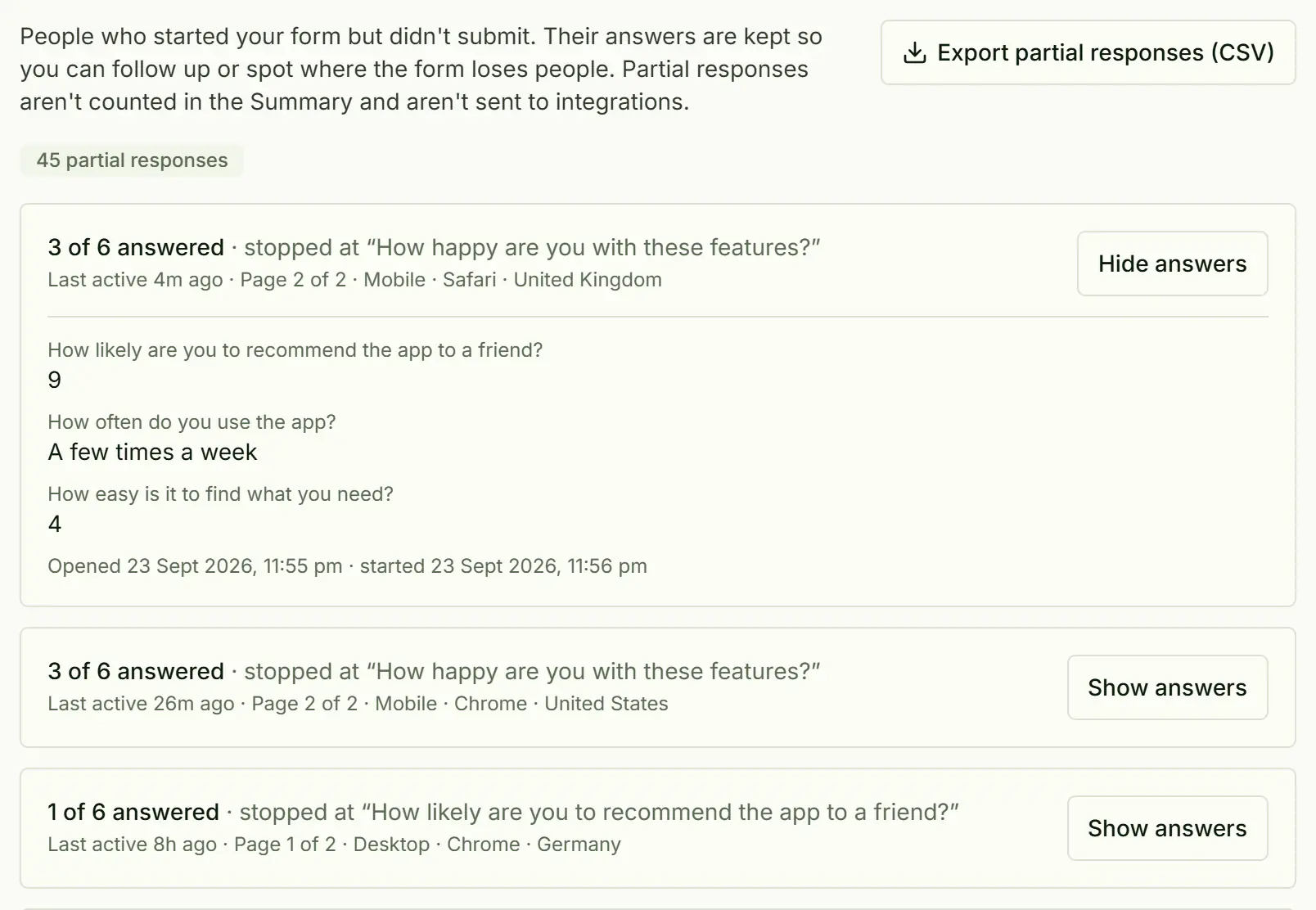
Keep answers from people who started but didn’t finish. Free shows the last 7 days. Pro keeps them all, sends them to your tools and emails a reminder.

Free: last 7 days

Partial responses: 45 people who started but didn't submit, each showing how many questions they answered, where they stopped, and their answers so far.

Summaries and exports

Per-question charts, a searchable response table and CSV or Excel downloads.

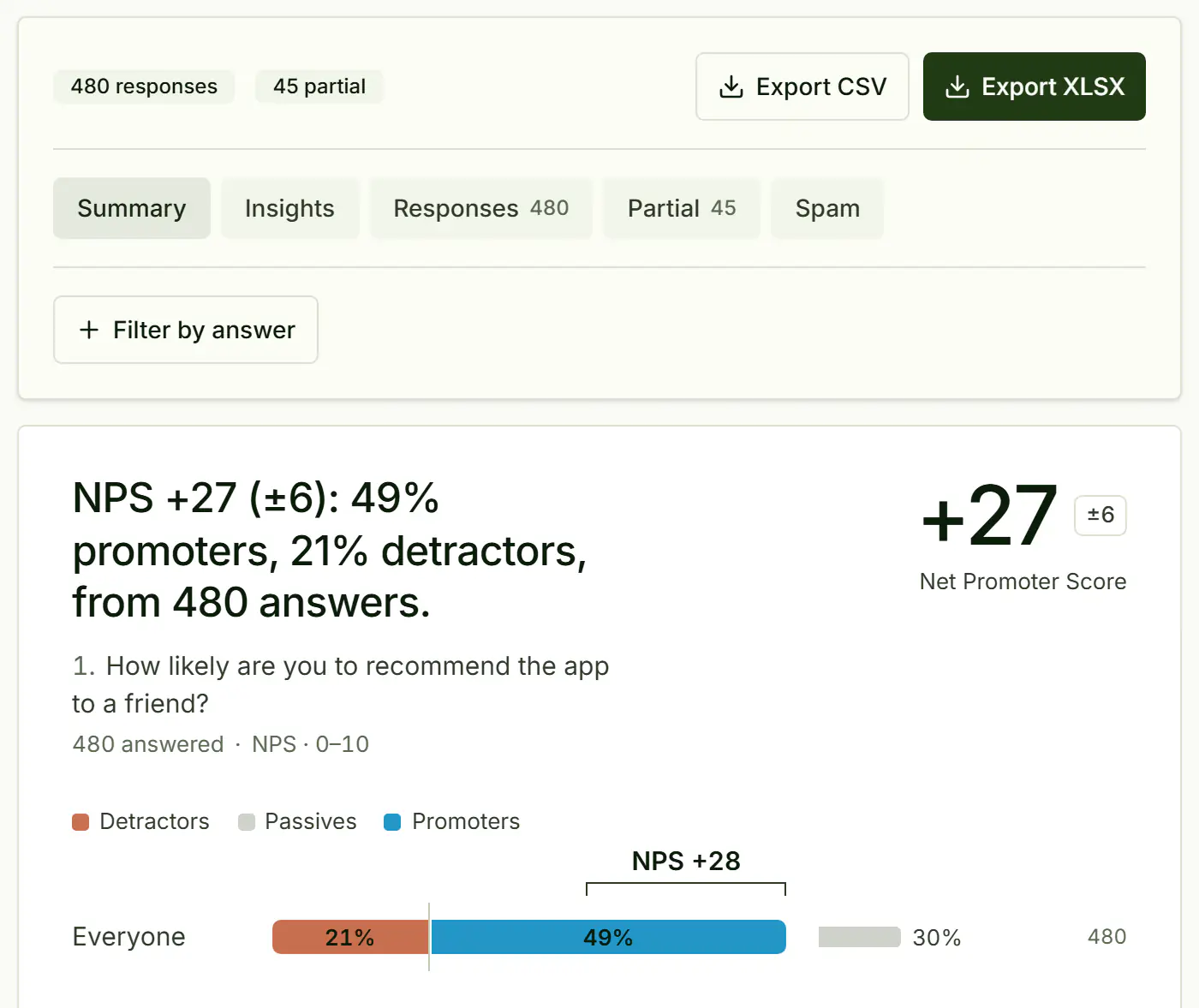
The results summary: 480 responses and 45 partial, Export CSV and Export XLSX buttons, and the recommend question's NPS of 29 with the promoter, passive and detractor split and a bar chart of every score.
  • NPS, worked out. Promoters, detractors and your score.
  • Search and filter. Search across every response.
  • Bulk actions. Mark many as done, tag or delete them at once, with Undo.
  • Notes and status. Keep a private note on each response and mark it done.
  • CSV and Excel. Download everything, any time.
  • Delivery log. Check and resend integration deliveries.

Your data leaves with you, whenever you like.

CSV and Excel export come with every plan. Delete your data

Publish your results as a report worth presenting.

Share one link to a live report with a chart for every question. Press Present and it becomes a slide deck.

pulseformcreator.com/reports/…
Open the live report

One question at a time, made for the phone in their hand.

Choose “One question at a time” in the Design tab and each question gets its own screen. Prefer one page? Keep “All questions on one page”.

  • A progress bar that follows each respondent’s actual path
  • Big, thumb-friendly answer buttons
  • Save and finish later, on any device
  • Works as a full page, an embed or a pop-up
The same post-event survey laid out one question at a time and with all questions on one page, on a laptop and a phone.

Branching logic you can read at a glance.

Show, hide and skip questions, grade a quiz and work out prices or ages, without code.

See the whole flow

Rules sit under the question they run after. Open Flow to see every question, jump and ending on one map.

Flow map of a three-question sun safety quiz, with a jump to the tips page and three outcome screens chosen by score.

Quizzes that grade themselves

Mark the right answers on the canvas, give partial credit and draw a different set of questions for each person. Scores go to your results and your tools.

Scoring: the correct answer to a quiz question marked and given a point, then the ending screen “Sun safety pro, you scored 3 out of 3”.

Hidden fields and prefill

Pass names or sources in the link, then greet people by name or prefill answers.

A prefill link with the hidden fields name=Mia and utm_source=newsletter, and the form greeting the respondent: Hi Mia.
  • Conditional questions. Show or hide blocks based on answers.
  • Answer piping. Type @ to reuse an earlier answer.
  • Calculated values. Formulas with IF, ROUND, AGE and date math.
  • Endings and redirects. Different thank-you screens, or your own page.
  • Otherwise. Run a second set of actions when a rule doesn’t match.
  • Access controls. Passwords, schedules, response limits and once-a-day rules.
  • Whole sections. Hide a section and every question in it hides too.
  • Email verification. Confirm respondents with a one-time code. Available on Business

Spam stays out of your results.

A hidden trap and a timing check catch bots, and what they catch waits in a Spam tab, out of your counts and your inbox. Real people never solve a puzzle. It is on for every form, free ones included.

Send every response to the tools you already use.

11 destinations in the Workflows tab, plus CSV and Excel downloads. Webhooks into Zapier, Make and n8n reach thousands more apps.

  • Google Sheets

    Every response in your sheet.

  • Notion

    A database page per response.

  • Airtable

    A table record per response.

  • Slack

    Post responses to a channel.

  • Discord

    Share responses in your server.

  • Webhooks

    Signed JSON to any URL.

  • Zapier

    Start a Zap from a Catch Hook.

  • Make

    Start a scenario from a custom webhook.

  • n8n

    Start a workflow from a Webhook node.

  • Email me

    An email for each response.

  • Email the respondent

    A confirmation with their answers. Available on Pro

  • CSV and Excel

    Download responses on any plan.

Build forms by asking Claude.

A free API and MCP server for your forms, responses and webhooks. API docs

Start from a form that already works.

66 free form templates in nine groups. Each one is a working form you can preview, print or open in the editor.

Start from a template

Start your form now.

Build it here, share the link and watch answers arrive. No card, no caps.

The thank-you screen a respondent sees on their phone after submitting: “Thanks for your feedback”.

Questions before you start

Still curious? Contact us

Is PulseFormCreator really free, and what does fair use mean?
Yes. The Free plan includes unlimited forms and responses, all 24 question types, logic, integrations and CSV or Excel export. AI triage reads 100 responses a month on Free and every response on Pro. Fair use is the same on every plan: up to 50,000 responses, 100 GB of file uploads (500 GB in total) and 50,000 notification emails a month. If you regularly go past that, we’ll talk with you about a custom plan rather than cut you off. Read about fair use.
Can I put a form on my website?
Yes. PulseFormCreator is a web form builder: paste one snippet and the form sits on your page, in any of 8 embed styles, from a standard embed to a popup or a chat widget.
Can I print a form or send it as a PDF?
Every template has a printable PDF of the same questions, for people who need paper or want to see the whole form before they start. Your own form is best shared as a link or embed, so answers arrive in your results without retyping. Each response you get back also downloads as a PDF, on every plan.
How is PulseFormCreator different from Tally, Typeform and Google Forms?
Against Tally, one question at a time is a single setting here, your rules and endings sit in the editor with a Flow map of the whole path, and there are 8 embed styles. Against Tally, people can also edit their own answers after submitting, options can have a limited number of places, and quizzes can be timed. Against Typeform, the free plan has no monthly response ceiling. Against Google Forms, respondents never need a Google account, even to upload a file. And each response can start a conversation: it’s read and flagged, you reply from it, and their answer comes back to the same thread. Read the Tally alternative, Typeform alternative and Google Forms alternative comparisons.
Do I need an account to start?
No. Build a whole form in the builder on this page, and even set up its workflows. Your draft stays in this browser, and you only need to confirm your email address when you want to publish and share it. Try the builder.
Can a form change based on the answers?
Yes. Rules that show, hide or skip questions sit under the question they run after, calculations add up totals as people answer, and each person can see a different thank-you screen. Flow shows the whole path on one map. How logic works.
Can people edit their answers after submitting?
Yes. Turn on Allow editing and each person gets a private link on the thank-you screen and in their confirmation email. Every change is kept as a version you can open, and your integrations update the same row.
Can I make a form in more than one language?
Yes. Add languages in Settings, translate every question in one click and fix any line yourself. People choose their language on the form, right-to-left languages included, and all answers land in one set of results.
Can I limit how many people pick an option?
Yes. Give any option a limit, such as 20 places for a 10:00 class. Full options close on their own, the form can show how many places are left, and a deleted response frees its place.
How is my data protected?
Responses and files are encrypted in transit and at rest. Only you, and teammates whose role allows it, can see your responses, and uploaded files are not public. Read about security.
Does it work well on phones?
Yes. Choose “One question at a time” in the Design tab and respondents see one question per screen, with large answer buttons and a progress bar that follows their path. They can come back later and finish on the same device, and you can build and edit forms on a phone too.
Which integrations do you support?
Google Sheets, Notion, Airtable, Slack, Discord, signed webhooks, Zapier, Make and n8n, plus email notifications to you and, on Pro, to respondents. See every integration.
Can I export or delete my data?
Yes. Download responses as CSV or Excel on any plan, delete a form whenever you like, or delete your account and its data.